
Add skills to an agent
Give an agent skills from your library in its Brain settings, see how it decides when to use them, and how edits and deletions reach it on their own.
On this page
Skills live in your skill library until you hand them to an agent. Each agent gets only the skills you switch on for it, so a bookkeeping agent can carry the invoice skills while your support agent carries the reply-tone skill.
Before you start#
- At least one skill in your library. Write one or add a starter skill on the Skills page. If the library is empty, the agent's Skills panel offers a Create a skill button that takes you there.
- A Hermes agent that has finished setting up. Skills can be imported into Hermes agents today; on other runtimes the Skills panel does not appear. The Brain section unlocks once setup finishes.
Switch skills on#
- Open the agent and click Settings, then Brain.
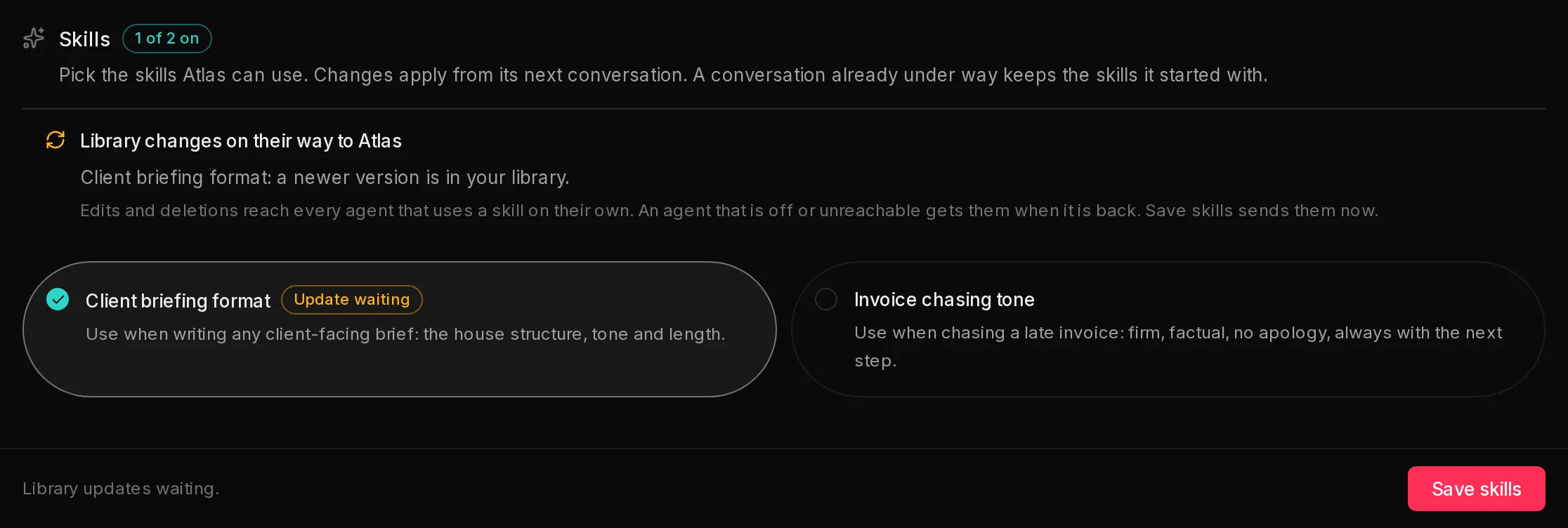
- Scroll down to Skills. Every skill in your library is a card, showing its name and its "when to use it" line.
- Click a card to switch it on (1). Click it again to switch it off. The badge counts how many are on, for example "1 of 2 on".
- Click Save skills (3).
 123
123The bar at the bottom says Unsaved changes. until you save, then Saved.
When the agent starts using a change#
A change applies from the agent's next conversation. A conversation already under way keeps the skills it started with, so to try a change straight away, start a new chat, or send /new in a messaging app such as Telegram. Scheduled tasks always start fresh, so their next run uses the change.
When skills change, Qoren restarts the agent's messaging and chat service if it is running, so that new conversations see the new list. A reply the agent is writing at that moment can be cut off; send the message again if that happens.
How the agent uses a skill#
When you save, Qoren writes each skill you switched on into the agent's own skills folder, as a SKILL.md plus any files the skill bundles. Skills you switched off are removed from that folder.
The agent always knows which skills it has and when each one applies, from their "when to use it" lines. When a task matches, it opens that skill's full instructions and follows them, and opens a bundled file when the instructions call for it. So you do not need to tell the agent to use a skill: describe the task, and it reaches for the right one.
If an agent never seems to use a skill, the "when to use it" line is usually too vague. Edit it in the library to name the situation plainly. The agent gets the new wording on its own, as described below.
Edits and deletions reach the agent on their own#
When you save a change to a skill in the library, Qoren sends the new version to every agent that has it switched on, within moments. When you delete a skill from the library, Qoren removes it from every agent that had it. You do not need to visit each agent.
An agent that is switched off, paused, still setting up or unreachable at that moment is not skipped for good. It gets the change once it is running again, usually within 15 minutes, and a repair also brings its skills up to date.
Until a change has landed, the agent's Skills panel lists what is on its way (2): a skill with a newer version in your library is marked Update waiting, and a skill you deleted is listed as still on the agent. To send it right away, click Save skills, which is available even when you have not changed the selection.
Remove a skill from an agent#
Switch the skill's card off and click Save skills. The skill is removed from the agent's folder, and your library copy stays.
To remove a skill from every agent at once, delete it from the library.
Frequently asked questions#
Why is there no Skills panel on my agent?
Skills can only be imported into agents whose runtime supports them, which today means Hermes. On OpenClaw and Codex agents the panel is not shown. It is also locked while an agent is still setting up.
Do I need to tell the agent to use a skill?
No. The agent reads each skill's "when to use it" line and opens the skill when a task matches. Asking it directly works too.
How many skills can one agent have?
You can switch on any of the skills in your library. Keep each "when to use it" line distinct so the agent can tell them apart.
I edited a skill but the agent still does the old thing. Why?
A conversation that was already going keeps the skills it started with. Start a new chat, or send /new in a messaging app. If the agent's Skills panel still shows Update waiting, the agent has not received the new version yet: click Save skills to send it now.
Does every change restart my agent?
Only its messaging and chat service, and only when the agent's skills actually changed. The agent's memory and conversations are kept.