
See what each client costs
See what each agency client cost you on Qoren over a period, split into hosting, models, web search and mailboxes, so you can bill your clients with confidence.
On this page
When your environments are assigned to clients, Qoren adds up what each client's environments and agents used. You can read it for the last 30 days, this month or last month, in dollars and in credits, and use it as the cost basis for what you charge each client.
Read the totals on the Clients page#
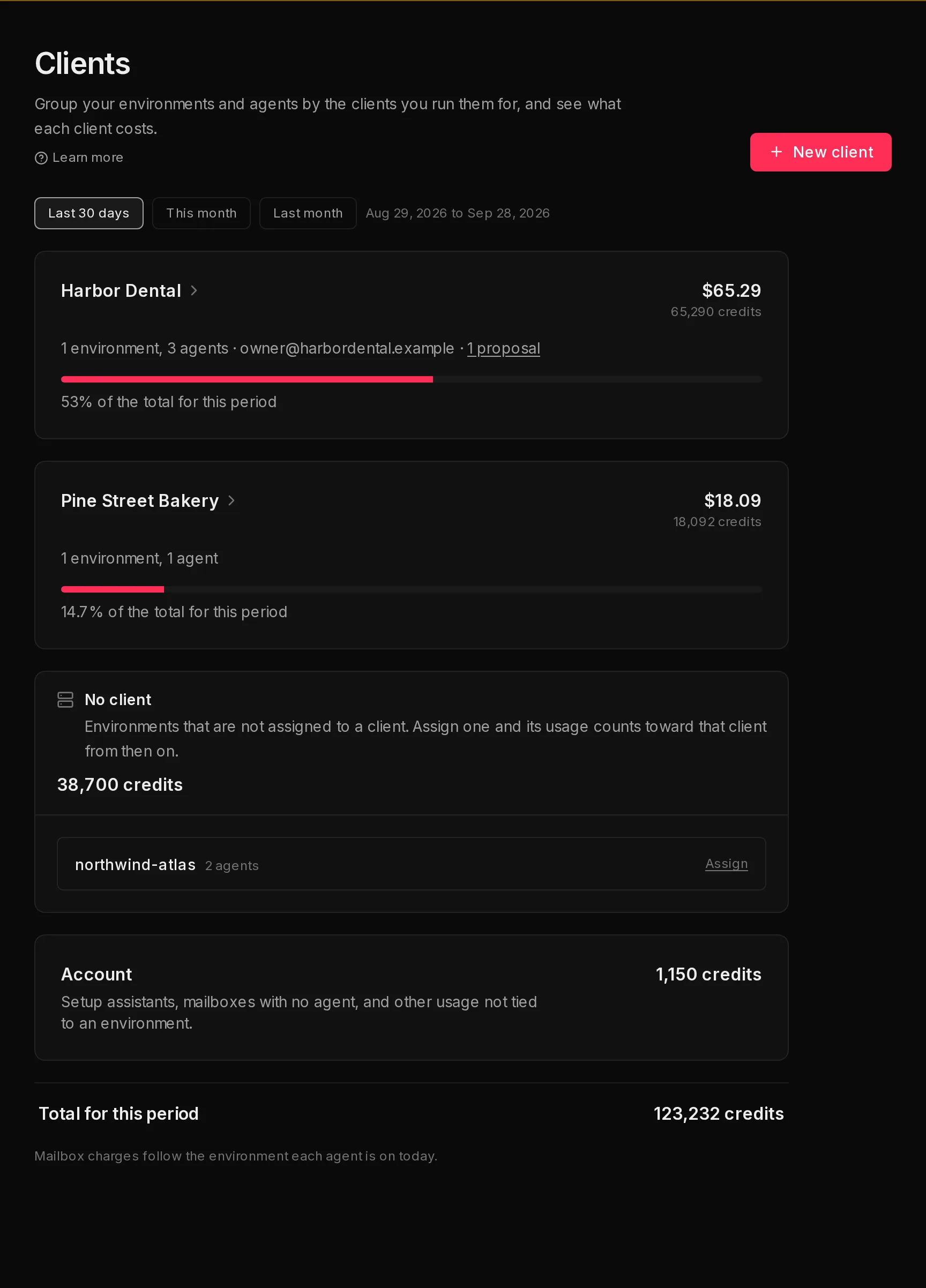
In the sidebar, open My Company and click Clients.
 123
123- Pick the period with the buttons at the top (1): Last 30 days (the default), This month or Last month. The exact dates show next to them.
- Read each client's cost at the top right of its card: dollars first, credits underneath. The bar shows its share of the period's total (2).
- Check No client: usage from environments that had no client when the usage happened.
- Check Account: setup assistants, mailboxes with no agent, and other usage not tied to an environment.
- Check Before client tracking, when it shows: usage in the period that was charged before Qoren started recording cost per client. It is real spend, so it counts in the total, but it cannot be split by client.
- Total for this period (3) is everything above added together. It matches Settings > Usage for the same dates.
Only client lines show dollars, because those are the figures you rebill. No client, Account, Before client tracking and the total are your own usage, so they show credits only.
See one client's breakdown#
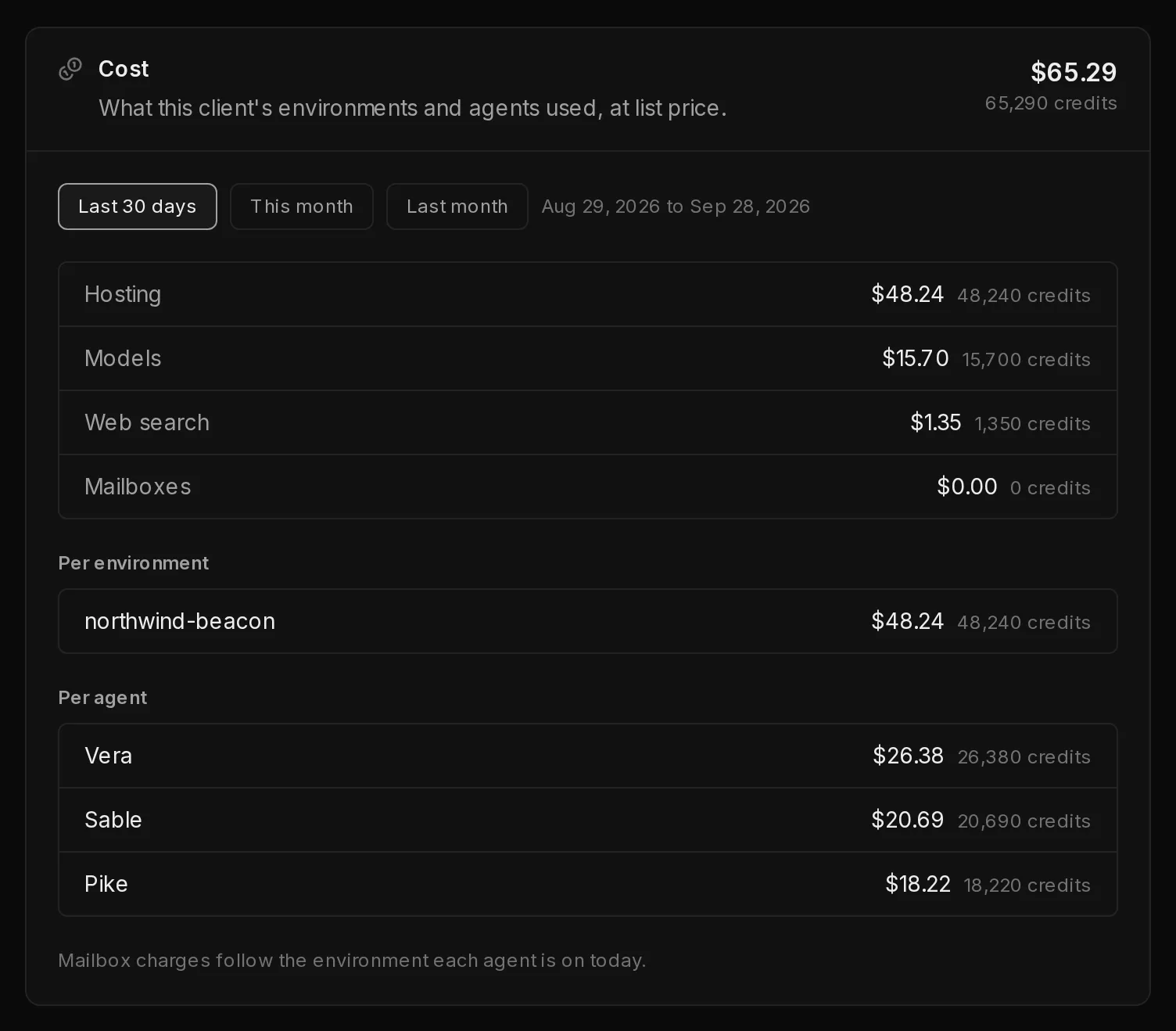
Click a client's name to open its page, then click the Cost tab. It shows "What this client's environments and agents used, at list price."
 123
123- The same period buttons as on the Clients page. The period you pick here is separate from the one on the Clients page, and starts on Last 30 days.
- The cost by category (1): Hosting (the hourly charge for its environments), Models, Web search and Mailboxes. A client with Custom agents also gets Custom agent runs (the fee per run) and Custom agent tools (charges for the tools those runs call). These two rows show only when they have usage.
- Per environment (2): the cost of each of the client's environments.
- Per agent (3): what each agent used.
An environment or agent removed since still shows what it used in the period, with "(removed)" after its name.
How the cost is worked out#
Everything your agents do draws credits from your one balance: environment hosting by the hour, model use, web searches and mailboxes. See how credits work.
- Each charge is recorded with the environment and agent behind it, and with the client that environment belonged to at that moment. That is why moving an environment to another client never moves its past cost.
- A charge shared by several environments or agents is split between them in proportion to each one's share, so every client's share adds up to exactly what left your balance.
- Mailbox charges follow the environment each agent is on today, not the one it was on when the charge happened. The page reminds you of this under the totals.
- Dollars are the list value of the credits used. They show what the usage is worth at Qoren's standard rate, which is the figure to rebill. Current rates are on environment sizes and agent capacity and the pricing page.
Notes under the totals flag anything incomplete:
- "Cost tracking started" on a date: usage before that date is not split by client.
- An amount "charged before cost tracking started": the same usage as the Before client tracking line. Model usage in it is worked out from the raw model cost, so it can be off by a few credits.
- A number of charges "still settling": recent usage not yet in these figures. Look again later.
- "Mailbox charges for this period are partial": pick a shorter period for exact mailbox figures.
Use it to bill your clients#
Qoren does not send invoices to your clients. It gives you the numbers to put on your own invoices.
- After the month ends, open Clients and click Last month.
- Open each client, click the Cost tab and Last month, and note the cost, or the per category split if you show it on your invoice.
- Add your own fee or margin on top in your invoicing tool.
To check a month against what you quoted, open the client's Proposals tab. A proposal prices usage from your estimates, so the real cost here can come in above or below it.
To keep each client's cost clean, give every client its own environment, and assign it before the client's agents start working. For your whole account's spending over time, see usage reports.
Frequently asked questions#
Why is some usage under No client?
It came from environments that had no client when the usage happened. Assign those environments now and their usage counts toward the client from then on. Past usage stays under No client.
Does the cost include my Qoren subscription?
No. Each client's cost is usage drawn from your credit balance: hosting, models, web search, mailboxes and Custom agent runs and tools. Your plan's fee is an account cost, so it does not appear on the Clients page and is never split by client. You can see it under Settings > Billing.
What is Before client tracking?
Usage charged before Qoren began recording which client each charge belonged to. It only shows for periods that reach back before that date. It stays in the total so the total still matches your usage report, but no client gets a share of it.
Why doesn't the total match my credit balance?
The total covers only the period you picked, and charges still settling are left out until they land. Your balance also reflects credits added by your monthly grant and top-ups.
Can I see the cost of a client I archived?
Yes. An archived client that had usage in the period still shows on the Clients page, and its page keeps its full cost history.