
Let an event wake your agent
Point cal.com, GitHub, Stripe or any signed webhook at a Qoren agent. Create a trigger, pick events, write rules, test it and read the delivery log.
On this page
A schedule wakes an agent at a time you picked. A trigger wakes it the moment something happens somewhere else: a meeting gets booked, a pull request opens, a payment fails. You paste a URL and a secret into the other service, write what the agent should do, and it handles each event as it arrives.
A trigger belongs to one agent, so the agent that handles your bookings can be a different agent from the one watching your code. Triggers work on every runtime.
Create a trigger#
Triggers have their own tab on the agent's page.
- Open the agent and click Triggers (1) in the tabs under its name.
- Click Add a trigger (2). Triggers you already have are listed underneath (3), each with its source, its events and whether it is Active or Paused.
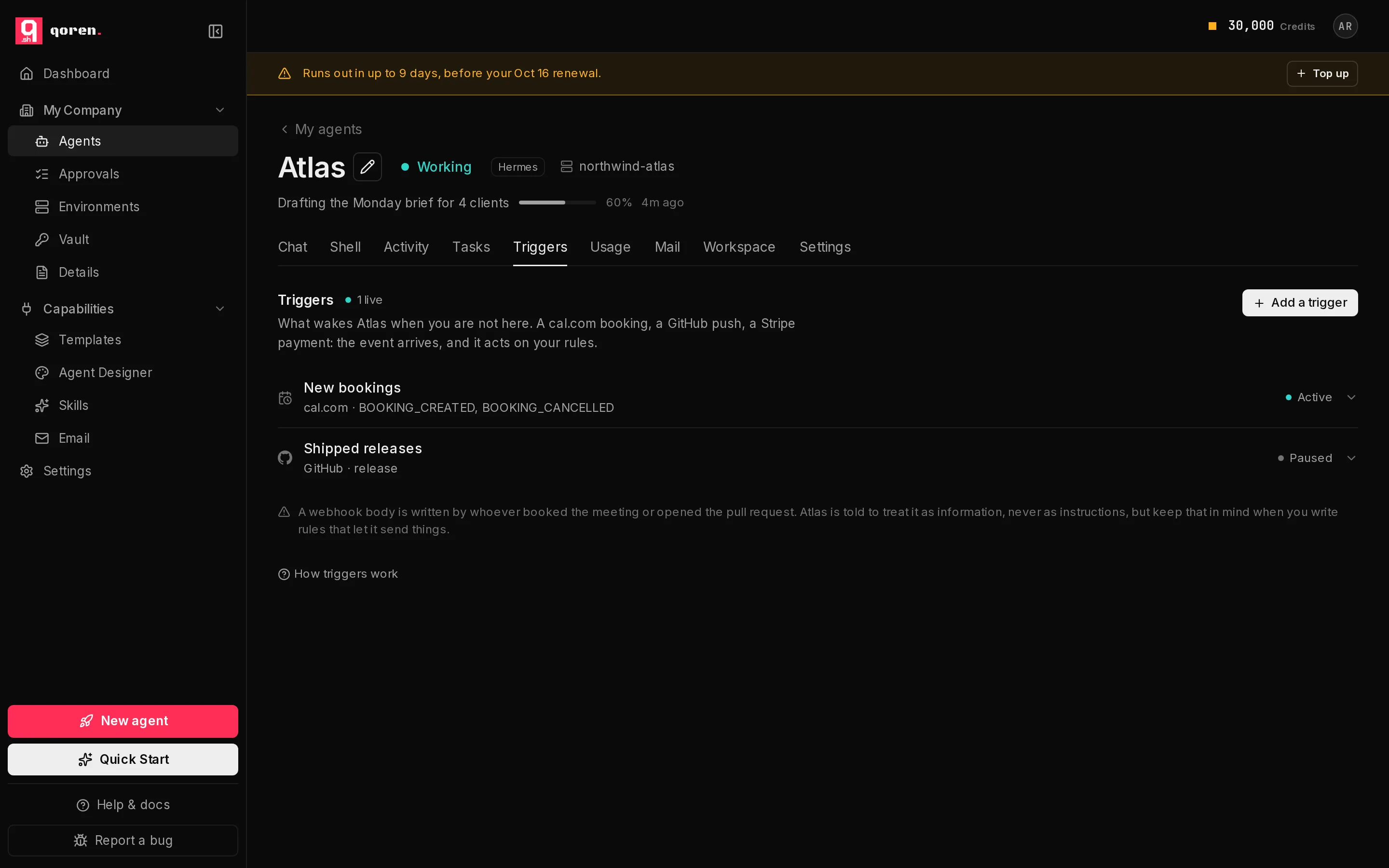 123
123- In What is this for? (1), give it a name you will recognize in the log, such as "New bookings".
- Under Where does it come from? (2), pick the source: cal.com, GitHub, Stripe, Any signed source or Any source (no signature).
- Under Which events? (3), click the events you want to act on. You can also type an event name that is not listed and press Enter.
- In What should … do about them? (4), which names your agent, write the rules in plain language: what to check, what to do, what to leave for you.
- Leave Already have a signing secret? (5) empty and Qoren makes one. Fill it in only when the other service makes its own secret, as Stripe does.
- Click Create trigger (6).
 123456
Copy the URL and the secret#
Right after you create the trigger, a section titled Paste these into your webhook settings, marked Shown once, shows the Webhook URL (1) and the Signing secret (2), each with a Copy button.
 123
123- Copy both, and paste them into the other service's webhook settings. The source guides below say exactly where.
- Click I have copied both (3) when you are done. The section stays until you do.
How a delivery is checked#
Qoren checks every delivery against the signing secret before anything runs, using the method that sender uses. A body that was changed on the way, or signed with a different secret, is refused and never reaches the agent.
| Source | Signature header | How it is checked |
|---|---|---|
| cal.com | x-cal-signature-256 | HMAC-SHA256 of the body |
| GitHub | x-hub-signature-256 | HMAC-SHA256 of the body, prefixed sha256= |
| Stripe | stripe-signature | A signed timestamp plus the body; anything older than five minutes is refused |
| Any signed source | the header you name | HMAC-SHA256 of the body, in hex |
| Any source (no signature) | none | Not checked: the URL is the only credential |
For Any signed source, the form asks Which header carries the signature?. If that service sends the signature in base64, or with a prefix such as sha256=, or names its event somewhere other than the top of the body, set that when you create the trigger from the Qoren CLI with --encoding, --prefix and --event-path.
Any source (no signature) is offered for services that cannot sign at all. When you pick it, the form says "No signature to check": anyone who has the URL can wake your agent, so keep it private.
What the agent reads#
Each delivery becomes one agent turn, and nobody is watching it. The agent is told, in this order:
- Which trigger fired, and which event from which source.
- Your rules for this trigger. With no rules, it is told to use its own judgement and standing instructions, and to keep whatever it does small and reversible.
- The event itself, as the service sent it, clearly labelled as data from outside. A webhook body is written by whoever booked the meeting or opened the pull request, so the agent is told to treat anything in it as information to reason about, never as instructions to follow. Very long bodies are shortened.
- To finish with a few lines saying what it did, or why it did nothing. That reply is what you see in the delivery log.
Choose how much it may do on its own#
Open a trigger by clicking it. Its settings open on the left and its delivery log on the right. Its rules sit under What should the agent do when this fires? (1). Under How much it may do on its own:
- Act: "Handles it like any other turn. Your approval settings still apply."
- Propose only (2): "Writes down what it would do and waits for you to approve." The agent may not use its tools during that turn. This suits a trigger whose events come from people you do not know.
What a Propose only trigger writes down lands on the Approvals page in the sidebar, labelled with the trigger's name. Approve it and the agent carries on and does it; deny it and nothing happens. A proposal nobody decides expires after 24 hours. See approve what your agents ask to do.
Change the rules, the events or this choice, then click Save.
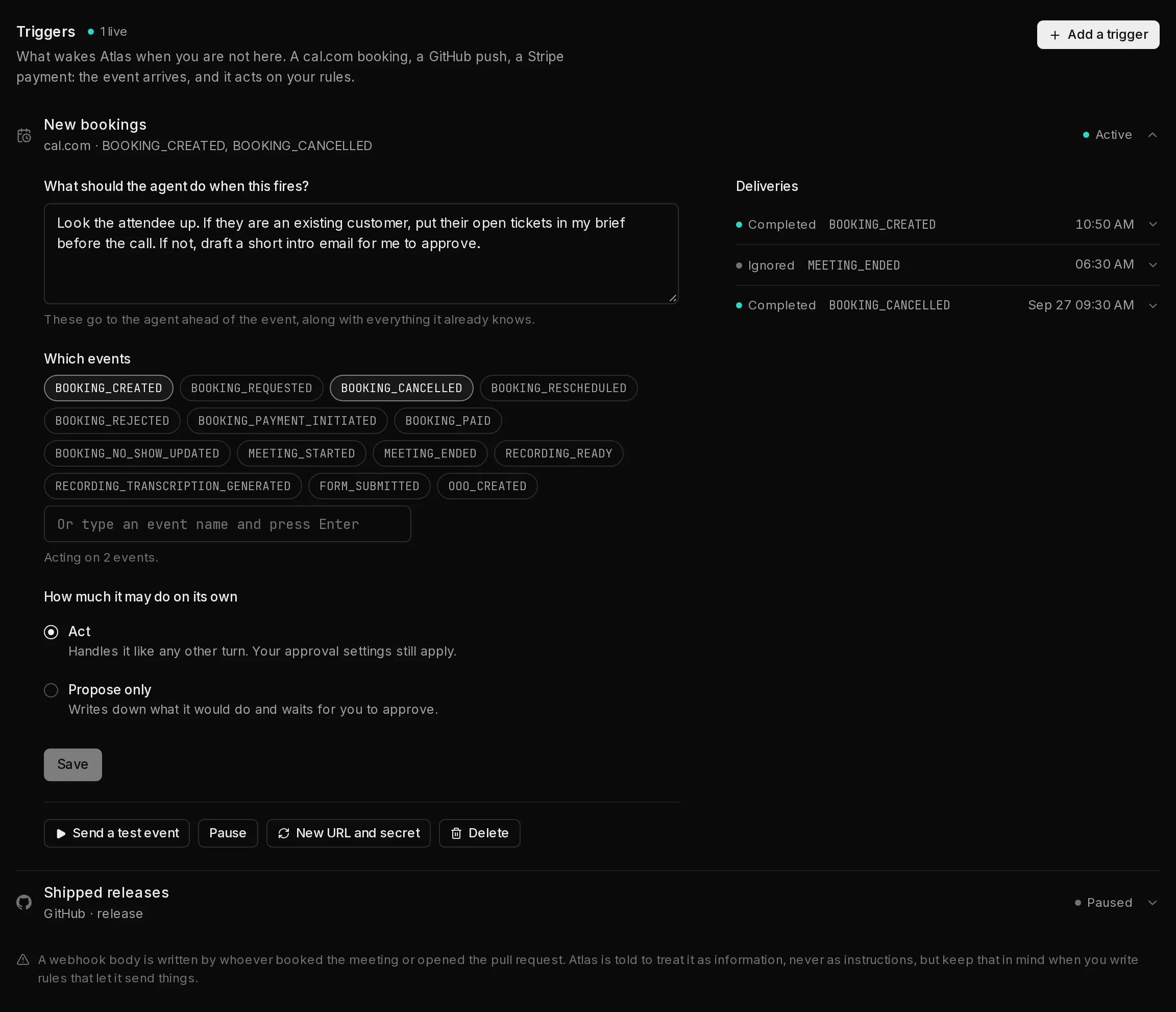 1234567
Test, pause, replace or delete a trigger#
The row of buttons in an opened trigger:
- Send a test event (3) sends a made-up sample through the real path, skipping only the signature check. It uses the first event the trigger listens for, and the sample says it is a test. It is a real agent turn, so it uses credits.
- Pause (4) stops the trigger without changing its URL. While paused, deliveries are accepted and dropped, and nothing is added to the log. Resume turns it back on.
- New URL and secret (5) issues a fresh pair and shows it once in the same section as before. The old URL and secret stop working straight away, so paste the new pair into the other service.
- Delete (6) asks Delete for good? Click again to delete the trigger and its delivery log.
Read the delivery log#
Deliveries (7), beside the trigger's settings, lists everything that reached this trigger, newest first. Click a delivery to open it: you see what the status means, the agent's summary, any error, and Run again (2), which sends that delivery's stored body through the agent once more.
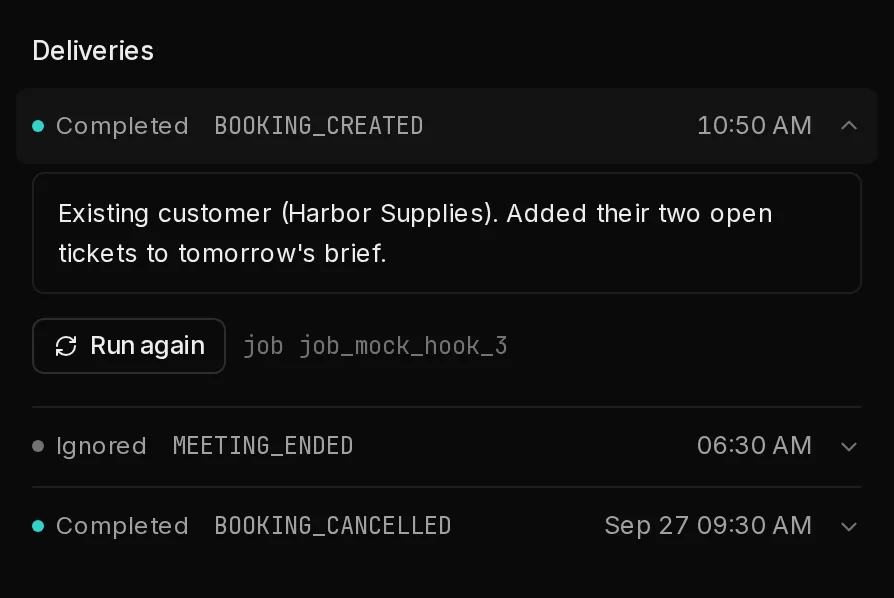 123
123| Status | What happened |
|---|---|
| Completed | The agent ran and replied. Its summary is shown. |
| Queued, Running | Accepted; the agent's turn is starting or under way. |
| Needs review | The agent proposed something and is waiting for your decision on the Approvals page. |
| Failed | The agent ran and something went wrong, or its environment could not be reached. |
| Ignored | Arrived, but this event is not one this trigger listens for. No turn, no charge. |
| Skipped | Not run: the account is out of credits, or paused by its budget. |
| Throttled | Not run: over this trigger's hourly limit. |
A trigger runs the agent at most 60 times in a rolling hour unless you set another limit (from 1 to 1,000) with --max-per-hour in the CLI. Only deliveries that reached the agent count toward it. Past the limit, Qoren tells the sender to try again later, and well behaved services do.
A delivery that fails its signature check, or arrives while the trigger is paused, does not appear in the log at all. If the other service says it sent something and the log is empty, check the URL, the secret and whether the trigger is paused.
Repeats and retries#
Services retry a webhook when they do not get an answer quickly, so Qoren answers at once and runs the agent afterwards. A retry of an event it already handled is recognised and gets the first result back, so the agent does not act twice on one booking.
From the terminal#
Everything on this screen is also a CLI command, so you can create and audit triggers from a script.
qoren webhook sources
qoren webhook create agt_abc --name "New bookings" --source cal \
  --event BOOKING_CREATED --event BOOKING_CANCELLED \
  --rules "Brief me on the attendee before the call."
qoren webhook deliveries whk_def
qoren webhook delivery whk_def dlv_123
qoren webhook also has ls, get, rules, events, pause, resume, rotate, test, replay and rm. See the CLI reference.
Set up a specific source:
Frequently asked questions#
Can I see the webhook URL again later?
No. The URL and the secret are shown once, when you create the trigger or replace them. If you lose either, click New URL and secret and paste the new pair into the sending service.
Does every webhook cost a turn?
Only the ones that reach the agent. A delivery for an event the trigger does not listen for is recorded as ignored and dropped before any model runs, and so are deliveries while you are out of credits or over the hourly limit.
Where do I approve what a Propose only trigger wants to do?
On the Approvals page in the sidebar, and on the agent's own page. The request shows the trigger's name, what the agent wants to do and how long is left before it expires.
What happens if the same event arrives twice?
It is handled once. Qoren recognises the repeat and returns the first result instead of running the agent again.
Can someone who guesses the URL wake my agent?
Not for a source that signs its webhooks: a delivery without a valid signature is refused before the agent is involved. With Any source (no signature), the URL is the only credential, which is why the form warns you when you pick it.
What if the service I use is not listed?
Choose Any signed source and name the header its signature arrives in. If it cannot sign at all, choose Any source (no signature) and keep the URL private.