
Delete your Qoren account
Delete your Qoren account with a 30-day grace period you can cancel, or permanently right away. What gets erased, and what happens to your plan and agents.
On this page
You can delete your Qoren account yourself from Settings. There are two ways: a scheduled deletion with 30 days to change your mind, or an immediate one that cannot be undone. If you only want to stop paying, cancel your plan instead; see manage your subscription.
Before you start#
- Export anything you want to keep. Download your account data first, see export your data, and save your agents' files from each agent's Workspace tab. Neither is recoverable after deletion.
- If you own an organization with teammates, every other member who holds a seat must delete their own account first. Until then, deletion is refused and tells you how many teammates are still in the way.
Delete your account with a 30-day grace period#
- Open Settings and choose Data & privacy.
- Under Delete account, click Delete account.
- If you own the organization, decide what happens to your agents' backups (1). Leave Also delete my agent backups immediately unticked to have them kept for 30 days after your account is deleted, then deleted. Tick it to have them deleted with your account. See your agent backups.
- Type
DELETEin the box (2) and click Schedule deletion (3). The confirmation says what happens: nothing is erased for 30 days, and you can cancel before then.
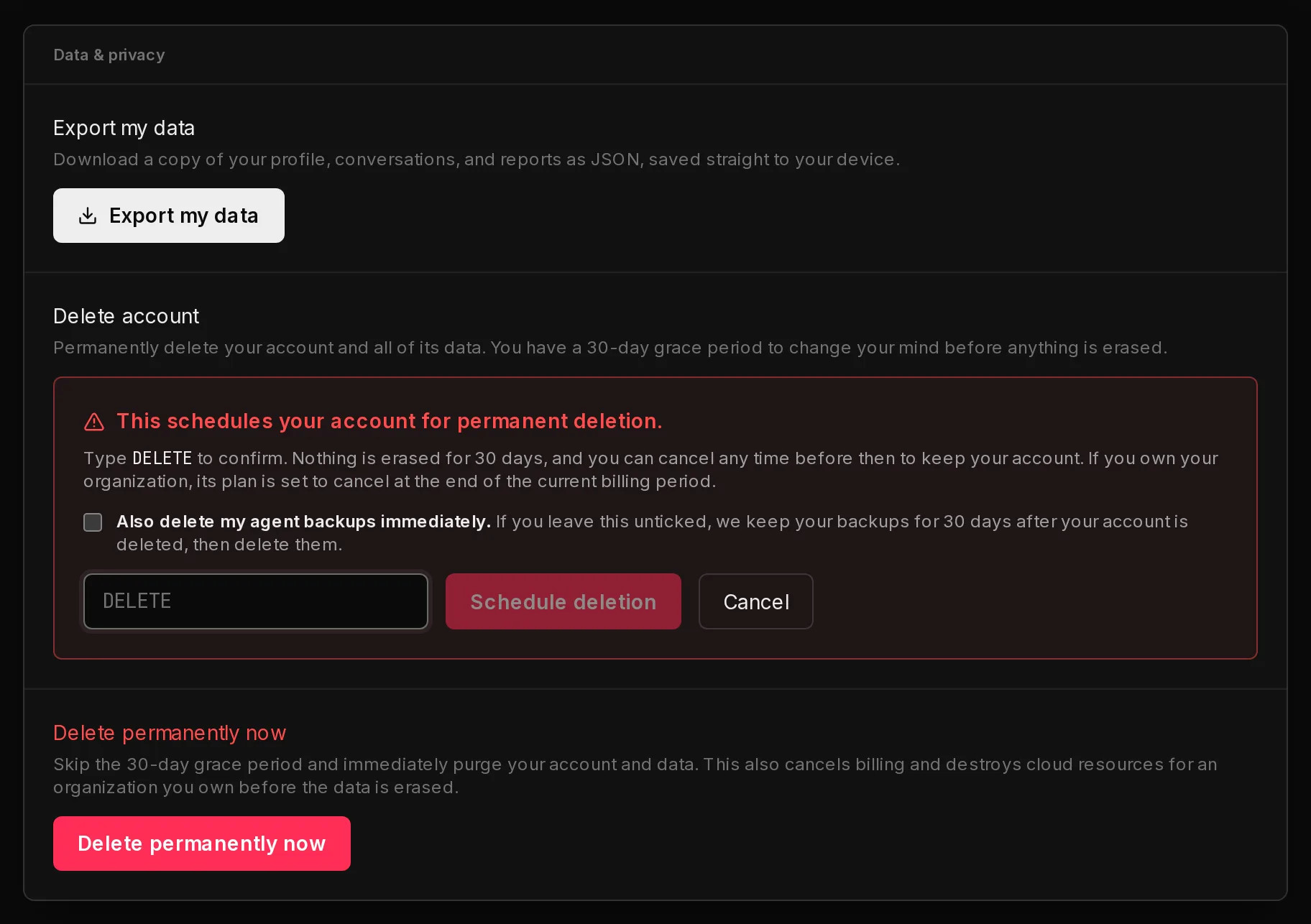 1234
1234Your account is now scheduled for deletion. You get an email confirming the date, and the card shows Your account is scheduled for deletion on that date.
During the 30 days:
- You can still sign in and change your mind. In Data & privacy, click Cancel deletion. You get an email confirming it.
- If you own the organization, your plan is set to cancel at the end of the current billing period. Cancelling the deletion undoes this, as long as the plan has not already ended.
- Your environments and agents keep running. Nothing is torn down during the grace period, so cancelling the deletion leaves everything as it was. If your plan ends before the deletion date, they run on your remaining credits, as described in manage your subscription.
- Your backups choice stays as you set it. The card reminds you which one you picked. To change it, cancel the deletion and schedule it again, which asks again. Delete permanently now also asks again, and its answer replaces the earlier one.
When the 30 days are over, the deletion runs exactly like an immediate one: if you own the organization, its billing is cancelled and its environments and the agents on them are destroyed first, and then your account and all of its data are permanently erased. Your agent backups are kept or deleted as you chose.
Delete your account immediately#
Use this when you want everything gone now. It cannot be cancelled.
- Open Settings and choose Data & privacy.
- Under Delete permanently now, click Delete permanently now.
- If you own the organization, tick Also delete my agent backups immediately (1) to have your backups deleted with your account, or leave it unticked to have them kept for 30 days first.
- Type
DELETE PERMANENTLY(2) and click Delete permanently (3).
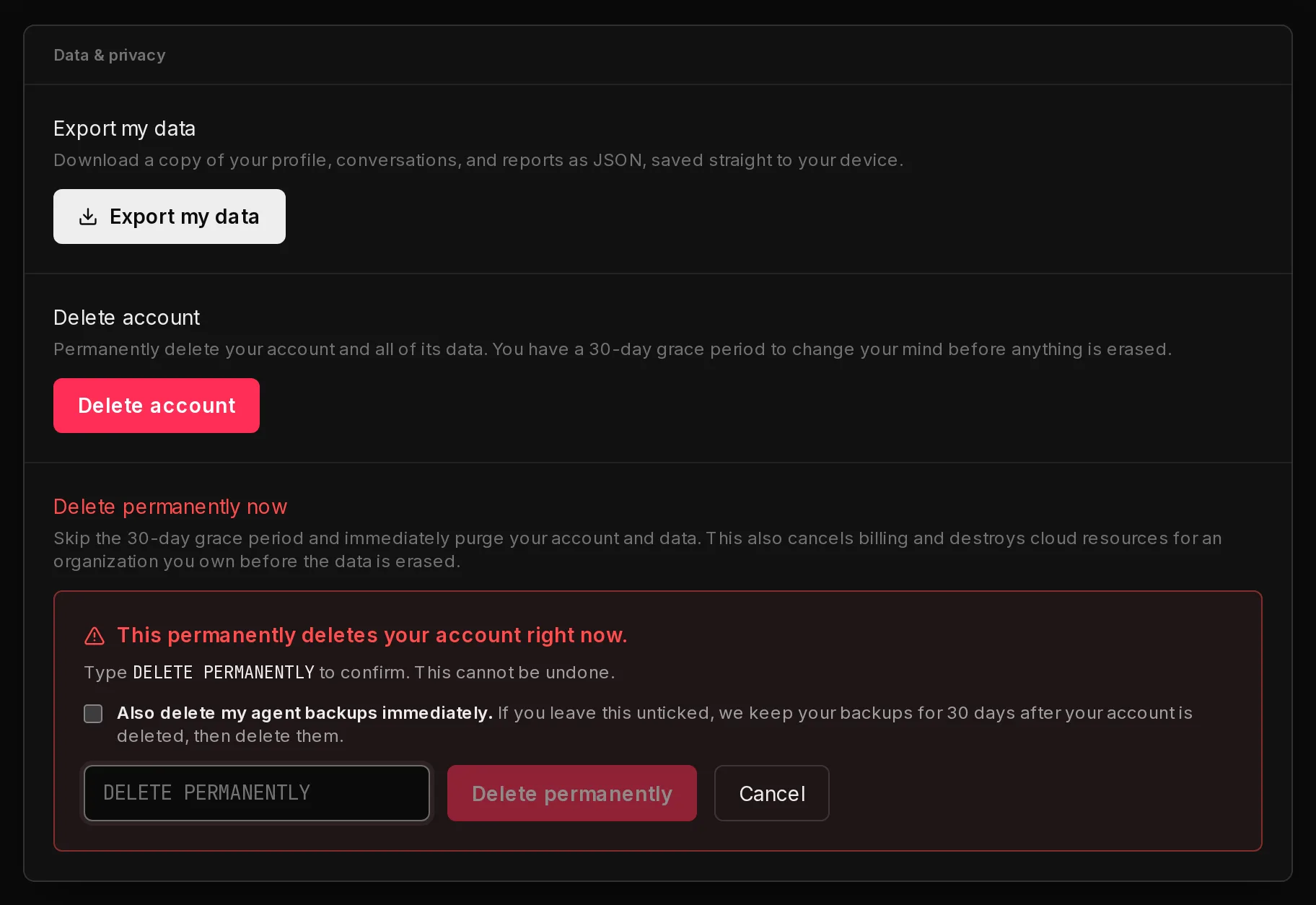 123
123If you own the organization, Qoren first cancels its billing and destroys its cloud resources, your environments and the agents on them, and then erases the data. You are taken to the sign-in page straight away; the erasure finishes in the background, usually within a few minutes.
You can also do this during a scheduled deletion's grace period: the same Delete permanently now option stays on the card.
What is deleted#
When the deletion runs, Qoren erases:
- your profile, sign-in methods and sessions,
- your chats with agents and your Quick Start sessions,
- your CLI access tokens.
If you own the organization, it also erases everything the organization owns:
- its environments and the agents on them, with their scheduled tasks and pending approvals,
- its removed agents, and its agents' backups either straight away or 30 days later, as you chose (see your agent backups),
- its agent mailboxes, deleted at our email provider together with the mail in them,
- its webhook triggers, whose URLs stop accepting deliveries, and the file links its agents shared, which stop working,
- its templates, skills and clients, and the passwords and keys saved in its Vault,
- the organization itself, its credit balance and history, its billing settings and its subscriptions.
The environments go first. Nothing is erased until every environment is confirmed destroyed and the mailboxes are confirmed gone, and, if you chose to delete your backups immediately, the backups too. If a step needs a retry, the erasure waits for it rather than leaving a server or a mailbox behind, so it can take longer than a few minutes. You stay signed out meanwhile.
Teammates who belonged to your organization keep their own accounts; they are simply no longer part of it. While the erasure runs, a teammate who is still in the organization cannot use it: the console shows This organization is being deleted, and the CLI and API refuse their calls with the same message. Once the erasure finishes, they can sign in again and start a workspace of their own.
Your agent backups#
If you own the organization, your agents' backups hold their files, workspace and settings (never the keys in your Vault). By default Qoren keeps them for 30 days after your account is deleted, then deletes them for good. The 30 days start when the erasure finishes, not when you schedule it.
They are kept so a deletion made by mistake is not the end of your agents' work. You cannot sign in or restore them yourself once the account is gone, but within those 30 days you can email hello@qoren.sh from the address the account used and we can send you a copy of an agent's backup. Nobody else can reach them, and after the 30 days nothing is left.
If you would rather they go with the account, tick Also delete my agent backups immediately when you confirm the deletion. If you change your mind after the account is deleted, email hello@qoren.sh and we delete the kept backups early.
If our team deletes your account for you, the same applies: the backups are kept for 30 days unless you ask for them to be deleted straight away.
What is kept#
- A record of account and billing actions, such as when the deletion was requested and when the environments were destroyed. It holds identifiers, what happened and, for actions taken in the console, the IP address and browser they came from. It never holds your content, and is kept to answer billing and security questions.
- A record of your backups choice, as part of that record: which option was chosen, whether you chose it or our team did on your behalf, which account and email it was for, when and from which IP address and browser, and when the backups are due to be deleted. It then records when the backups were kept, when they were deleted and how, any retry that was needed, and any time our team downloaded one to send to you.
- Your agent backups for 30 days, unless you chose to delete them immediately, as described above.
- Your orders and invoices at Polar, our payment provider, which has to keep them. Your customer record there is anonymized: your email and name are replaced and your billing address is removed.
Frequently asked questions#
Can I get my account back after 30 days?
No. Once the grace period ends, the account and its data are erased for good. Cancel before the date shown in Data & privacy if you want to keep it.
Does deleting my account cancel my subscription?
Yes, if you own the organization. A scheduled deletion sets the plan to cancel at the end of the current billing period. Immediate deletion cancels billing straight away.
What happens to my environments?
If you own the organization, both kinds of deletion destroy them, and the agents on them, before anything else is erased. A scheduled deletion leaves them running until the deletion date, so you can still cancel. If you want them gone sooner, remove them yourself or use Delete permanently now.
Are my agents' backups deleted too?
Yes, if you own the organization. Every backup of every agent, including agents you removed earlier, is kept for 30 days after your account is deleted and then deleted, or deleted with the account if you tick Also delete my agent backups immediately. Download any backup you want to keep first; see backups and restore.
Can I get an agent back after my account is deleted?
Only within the 30 days, and only if you did not choose to delete your backups immediately. Email hello@qoren.sh from the account's address and we can send you a copy of the agent's backup. After the 30 days, or if you ticked the option, there is nothing left to recover.
Why does it say teammates still hold a seat?
An owner cannot delete an organization out from under its members. Each teammate with a seat has to delete their own account first. Once they have scheduled their deletion, they no longer block yours.
Is deleting my account the same as cancelling my plan?
No. Cancelling stops billing and keeps your account. See manage your subscription. To remove single agents, see remove or restore an agent.