
Spend controls: auto top-up, alerts and budgets
Set what happens to your Qoren spend when nobody is watching. Automatic top-ups, usage alerts by email or webhook, and a monthly budget that can pause agents.
On this page
Model usage is the one truly variable cost of running agents. Qoren is built so you are never billed for usage you did not pay for in advance: work draws from your monthly grant, then from credits you topped up, and stops at zero. The settings on this page decide what happens before you get there.
All three live in Settings, under Billing controls. The tab appears once your plan is active or in its free trial.
The spend order, in short#
- The monthly grant is spent first. It resets each billing period and unused grant credits do not carry over.
- Topped-up credits are spent next. They never expire.
- At zero, agents pause. No model calls, no web searches, and no new hosting charges. Environments and mailboxes stay in place, and everything resumes the moment credits are back.
There is no open-ended metered billing. The details are in how credits work.
Turn on automatic top-up#
Automatic top-up keeps agents running without you watching the balance.
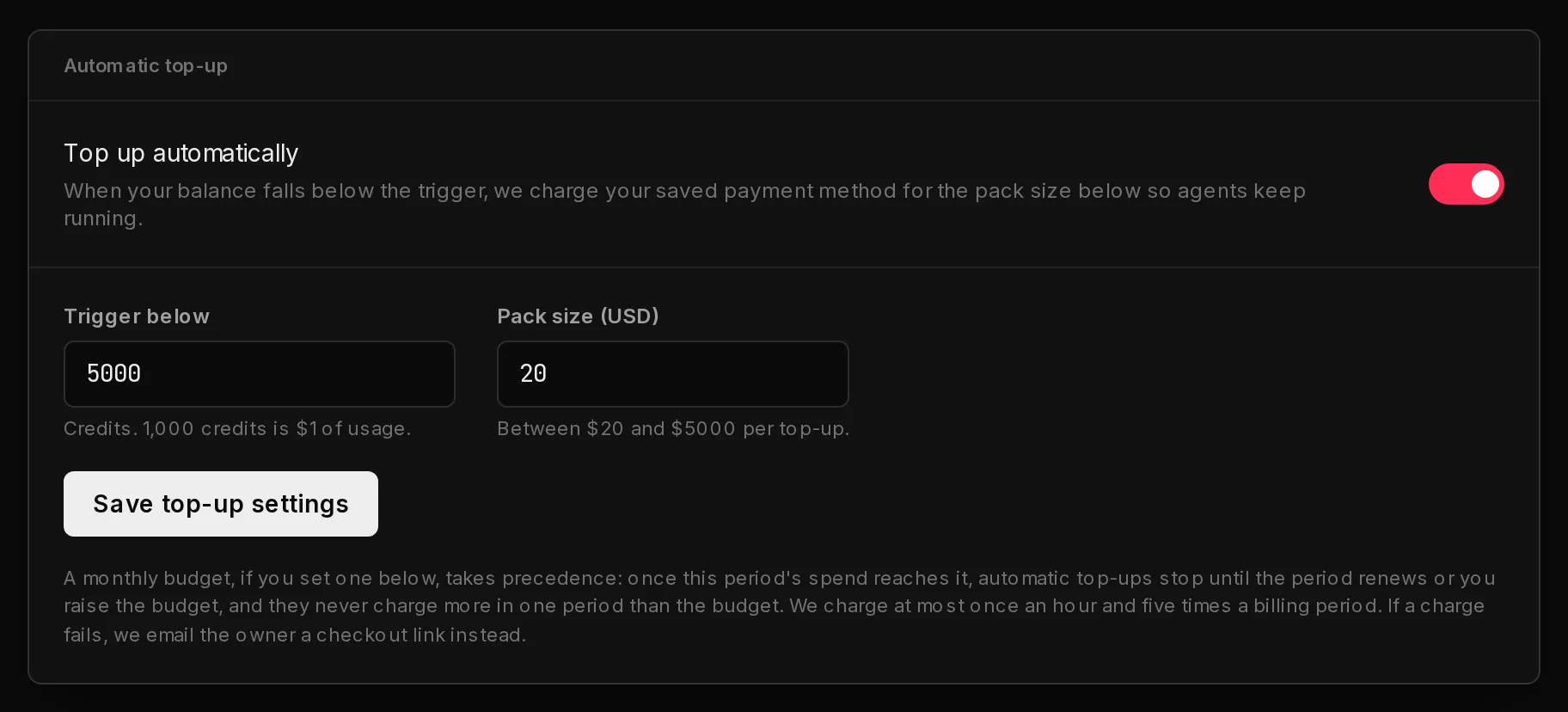
- Go to Settings and open Billing controls.
- In Automatic top-up, switch on Top up automatically (1).
- Set Trigger below (2): the balance, in credits, that starts a top-up. 1,000 credits is $1 of usage.
- Set Pack size (USD) (3): how much each top-up buys. The hint under the field shows the smallest and largest pack allowed.
- Click Save top-up settings.
 123
123When your balance drops below the trigger, Qoren charges one pack to the payment method saved on your subscription, without you being there. The credits are added as soon as the charge goes through, and you get the usual receipt by email.
Safety limits keep an unattended charge from running away:
- One charge at a time, at most one an hour. A charge that is still being processed blocks the next one.
- At most five automatic charges per billing period, and never more in a period than your monthly budget, if you set one.
- A declined card is not retried in a loop. Qoren emails the owner a checkout link for the pack instead and tries the card again a day later, then two days later. After three declines in a row it stops charging automatically until a top-up goes through, whether that is a manual one or the emailed checkout. The card shows a note while this is happening.
When a charge is not possible (for example, a limit is reached or no card is saved), Qoren emails the owner a checkout link for one pack instead, at most once a day while the balance stays below the trigger. Complete that checkout and the credits are added like any other top-up.
Automatic top-up only runs while your plan is active or in its trial. If you set a monthly budget, it takes precedence: once the period's spend reaches the budget, automatic top-ups stop until the period renews or you raise the budget.
Choose your usage notifications#
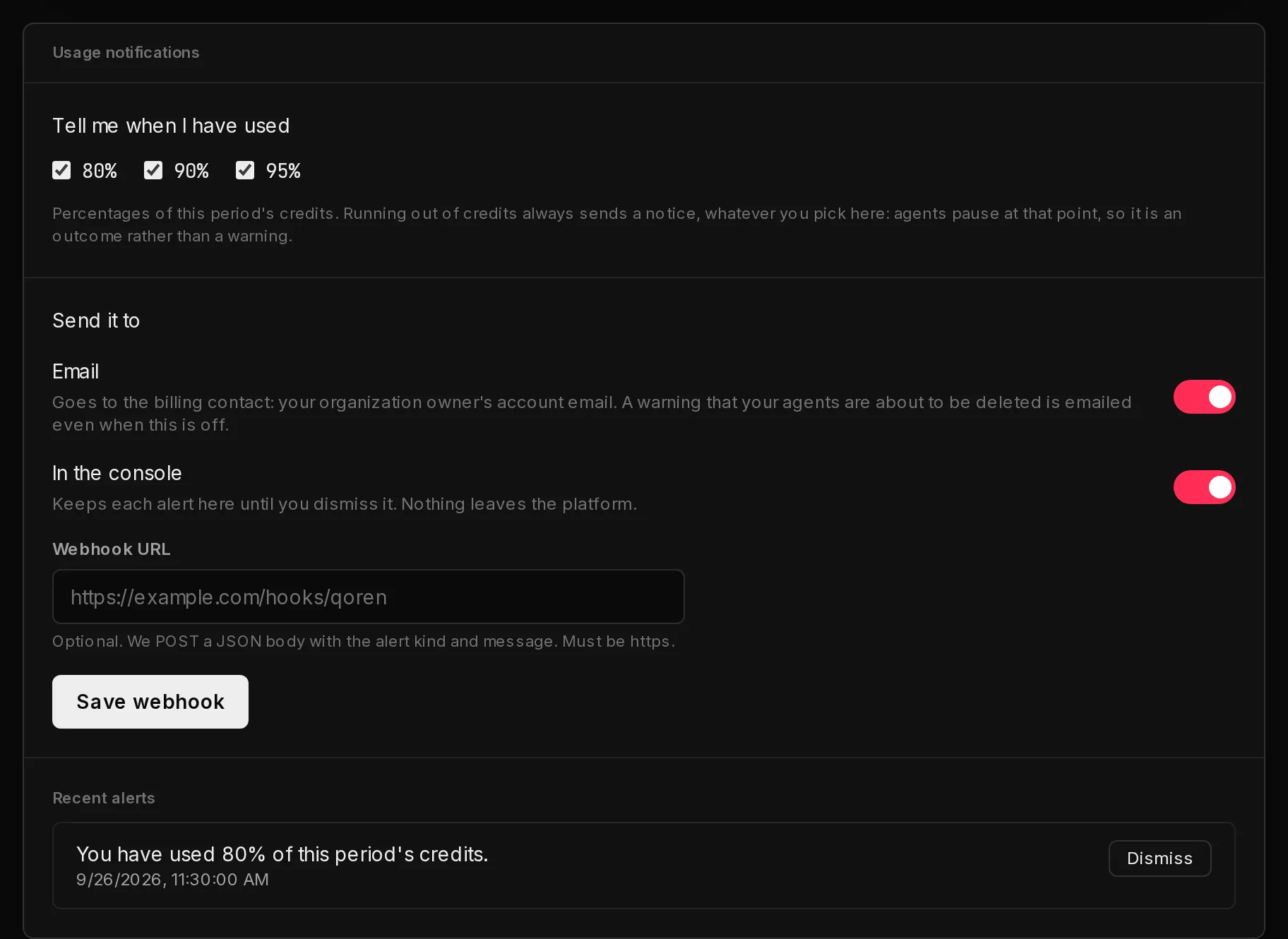
- In Usage notifications, under Tell me when I have used (1), tick the points you want to hear about: 80%, 90% and 95% of this period's credits.
- Under Send it to (2), switch on Email, In the console, or both. Email goes to the billing contact, the organization owner's account email. In the console keeps each alert on this tab under Recent alerts until you click Dismiss.
- Optionally, paste an https address into Webhook URL (3) and click Save webhook. Qoren sends each alert there as a JSON POST, so you can route it to a chat channel or your own tools.
 123
123Each threshold alerts once per billing period. Running out of credits always sends a notice on the channels you chose, whatever thresholds you tick, because agents pause at that point.
The webhook body carries type (always billing.alert), kind (for example p80, blocked or budget), a readable message, your orgId and a timestamp at.
Set a monthly budget#
A budget is a ceiling on what one billing period may spend, separate from the balance you hold. Use it when you have credits in hand but do not want a runaway agent to burn through them.
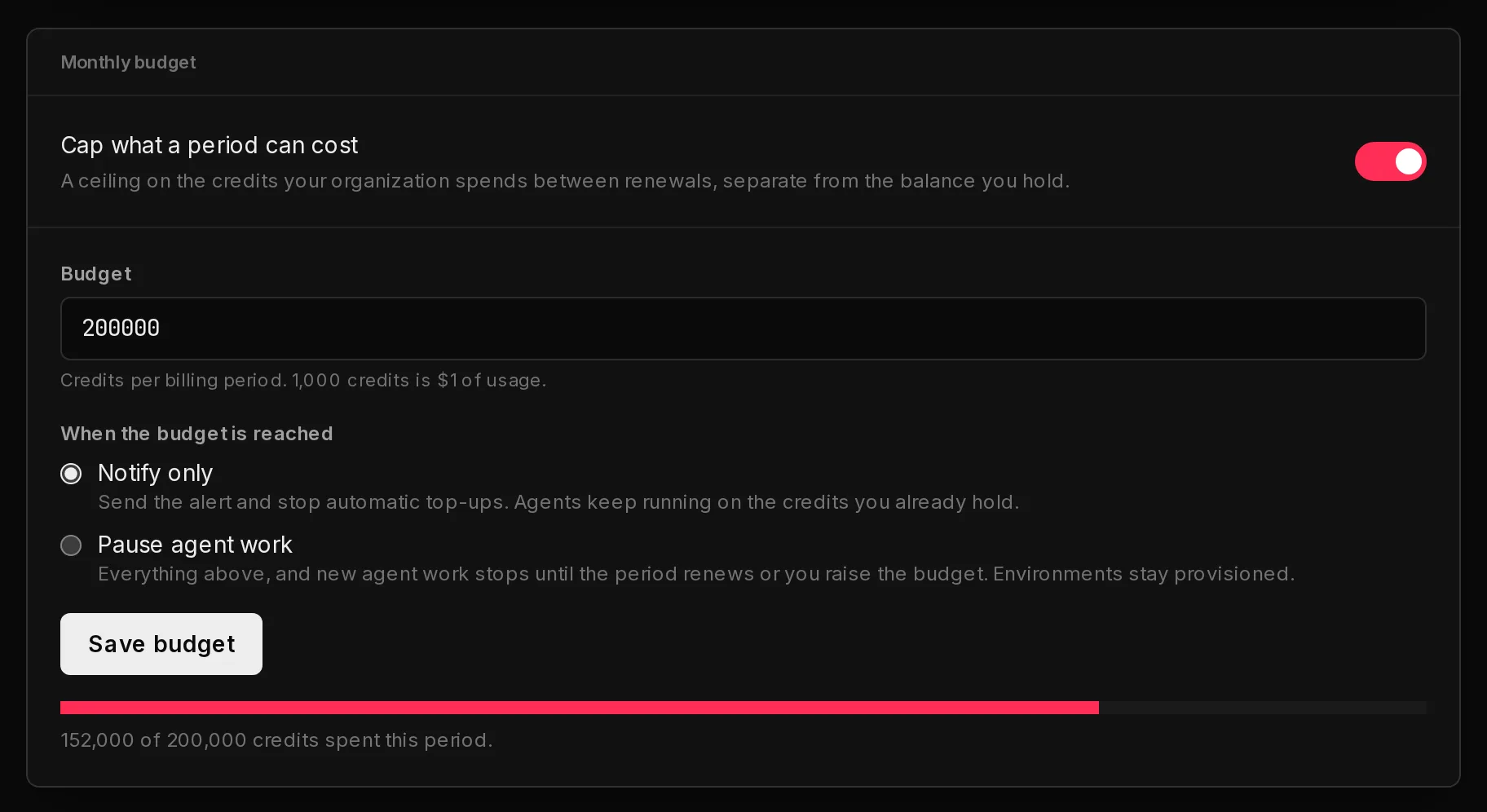
- In Monthly budget, switch on Cap what a period can cost (1).
- Enter the Budget (2) in credits per billing period. The smallest budget is 1,000 credits.
- Under When the budget is reached (3), choose Notify only to send the alert and stop automatic top-ups while agents keep running on the credits you hold, or Pause agent work to also stop agent work until the period renews or you raise the budget.
- Click Save budget.
 123
123Once a budget is on, the card shows how much of it this period has spent. Only real usage counts toward it: grant credits that expire at a renewal do not.
Bring your own model key#
Every plan, including the trial, can connect its own model key under Settings, then BYOK. Model usage then goes to your provider account instead of your credits. Environments, mailboxes and web searches still use credits, so these controls still matter. See bring your own model key.
See where the credits went#
- Settings, then Usage lists credits in and out by category for any date range. See usage reports.
- Each agent's Usage tab shows what that one agent spent. See agent usage.
- Agencies can see cost per client. See cost per client.
Frequently asked questions#
What happens when I run out of credits?
Your agents pause: they stop calling models and running web searches, and no more hosting or mailbox charges build up. Nothing is deleted. Top up, or wait for your monthly grant to reset, and everything resumes.
Does automatic top-up charge my card by itself?
Yes. When the balance falls below the trigger, Qoren charges the pack size you set to the payment method saved on your subscription and adds the credits straight away. If the card is declined or a safety limit is reached, the organization owner gets a checkout link by email instead.
How do I change the card automatic top-up uses?
Update your payment method under Manage billing on the Billing tab. Automatic top-ups charge your subscription's default payment method.
Can a monthly budget stop my agents even with credits left?
Yes, if you choose Pause agent work. With Notify only, agents keep running and only automatic top-ups stop.
Who gets the usage emails?
The billing contact, which is the organization owner's account email. Turning Email off in Usage notifications stops these emails. Warnings that a cancelled plan's environments are about to be deleted are always emailed.
Why can I not change these settings?
Only the organization owner can. Ask the owner, or have them change the policy for everyone.